AI Chat-Based Document Generation: How Conversations Become Invoices, Quotes & Proposals (2026)
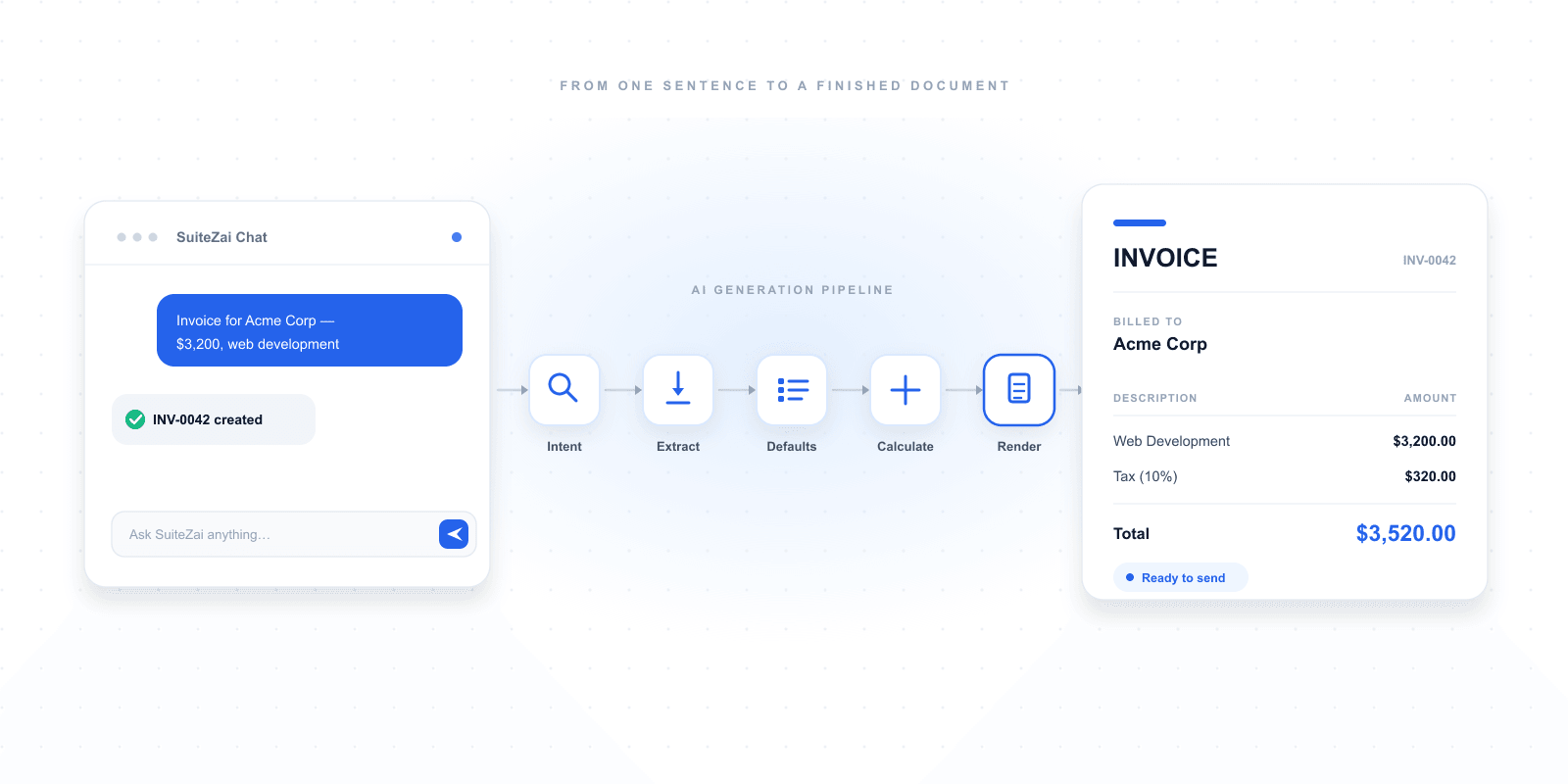
AI chat-based document generation lets you create a finished invoice, quote, or proposal by simply describing it in plain English — no forms, no templates, no manual data entry. Here's how the technology works, what it can (and can't) do, and how SuiteZai's assistant Lyra turns a single sentence into a send-ready document.
What Is AI Chat-Based Document Generation?
AI chat-based document generation is a method of creating business documents — invoices, quotations, and proposals — by describing what you need in plain, conversational language instead of filling out a form. You type a sentence like "Create an invoice for Acme Corp, $3,200 for web development," and a conversational AI assistant interprets the request, extracts the structured data, applies professional formatting, and returns a finished, send-ready document in seconds.
It replaces the traditional workflow — open a template, click through fields, type each value, calculate totals — with a single instruction. The AI handles parsing, math, formatting, and layout. In 2026, this is the fastest way for freelancers and small businesses to produce professional paperwork.
How AI Chat-Based Generation Works: The 5-Stage Pipeline
When you send a message to an AI document assistant like SuiteZai's Lyra, your request moves through five distinct stages before a document appears:
| Stage | What Happens | Example |
|---|---|---|
| 1. Intent detection | The AI identifies what you want to create. | "invoice" vs. "quote" vs. "proposal" |
| 2. Entity extraction | It pulls structured data from your sentence. | Client = Acme Corp, Amount = $3,200, Service = web development |
| 3. Smart defaults | Missing fields are filled with sensible values. | Invoice number, issue date, "Net 15" terms |
| 4. Calculation | Tax, discounts, subtotals, and totals are computed. | $3,200 + 10% tax = $3,520.00 |
| 5. Rendering | Data is placed into a professional template. | A formatted PDF-ready invoice preview |
The entire pipeline runs in under five seconds. You stay in a chat window the whole time — no switching screens, no learning a complex form.
AI Chat vs. Traditional Form Builders: A Direct Comparison
Most invoice tools still rely on manual forms. Here is how chat-based generation compares on the metrics that matter to a busy freelancer:
| Factor | Traditional Form Builder | AI Chat-Based Generation |
|---|---|---|
| Time to first document | 3–6 minutes | Under 30 seconds |
| Fields to fill manually | 12–20 | 0 (described in one sentence) |
| Content writing help | None | Drafts scope, terms, summaries |
| Mobile friendliness | Fiddly — tiny inputs | Excellent — just typing |
| Learning curve | Moderate | None — plain English |
| Best for | Precise, repetitive edits | Fast first drafts, content-heavy proposals |
The honest takeaway: chat is fastest for getting from idea to draft, while the form remains best for pixel-precise final tweaks. The strongest workflow uses both — generate with chat, polish in the form.
What Can You Actually Generate by Chat?
SuiteZai's Lyra assistant handles three core document types, plus content help:
| Document Type | Example Chat Command | Typical Output |
|---|---|---|
| Invoice | "Invoice for Bright Studio, 40 hours at $85/hr, 18% GST" | Itemised invoice, GST calculated, total $4,012 |
| Quotation | "Quote for a 5-page website redesign, 4-week timeline" | Line-itemed quote with scope and validity date |
| Proposal | "Proposal for a 3-month social media marketing contract" | Multi-section proposal with summary, scope, pricing |
| Content help | "Write professional payment terms for a design project" | Ready-to-paste terms and conditions text |
Example: One Sentence to a Finished Invoice
Here is a real exchange. You type:
- You: "Create an invoice for Acme Corp, $3,200 for web development, add 10% tax"
- Lyra: "Done — Invoice INV-2026-0042 created. Client: Acme Corp · Web Development $3,200 · Tax 10% $320 · Total $3,520. Want to add line items or send it?"
From one sentence, you get a numbered invoice, calculated tax, a correct total, and a follow-up prompt — all without touching a form field.
Why AI Chat-Based Generation Matters for Freelancers in 2026
- Speed compounds: Saving five minutes per document adds up to hours every month for anyone billing weekly.
- Fewer errors: The AI calculates every total, so there are no transposed digits or wrong tax math.
- Better writing: Proposals are where deals are won. AI drafts executive summaries and scope sections that read professionally.
- Mobile-first: Typing a sentence on a phone beats pinch-zooming through a 20-field form on a job site.
- Lower barrier: No onboarding, no tutorials — if you can describe the work, you can invoice for it.
Accuracy, Limits, and Best Practices
AI chat-based generation is powerful but not magic. Understanding its limits gets you better results:
| It Does Well | It Needs Your Review |
|---|---|
| Extracting names, amounts, and services | Ambiguous or unusual tax rules |
| Math — tax, discounts, totals | Exact legal wording for contracts |
| Professional default formatting | Client-specific custom fields |
| Drafting scope and summary text | Final pricing decisions |
Best practices for accurate results:
- Be specific: "Invoice for web design, $3,500" beats "make an invoice."
- Include the essentials: client name, service, amount, and currency.
- Iterate in small steps: "Add 18% tax," then "change terms to Net 15."
- Always review before sending: treat the AI output as a strong first draft.
Is Your Data Private?
A common concern with conversational AI is data security. With SuiteZai, the AI processes your request to generate content, but your finished invoices, quotes, and proposals are stored locally in your browser — not on a remote server. You get the speed of AI without handing over your client list or pricing strategy.
How to Try AI Chat-Based Document Generation
- Open SuiteZai: Go to suitezai.com — no signup required to start.
- Open the chat: Click the chat icon to start a conversation with Lyra.
- Describe your document: Type what you need in one plain-English sentence.
- Review and refine: Check the preview, then ask for any changes.
- Download or share: Export a professional PDF or send a secure link.
The Bottom Line
AI chat-based document generation is the clearest productivity upgrade for freelancers and small businesses in 2026. It collapses a multi-minute, multi-field chore into a single sentence — and frees you to spend your time on billable work instead of paperwork. Try it free on SuiteZai today.
Frequently asked questions
What is AI chat-based document generation?
AI chat-based document generation is a way to create business documents — like invoices, quotations, and proposals — by describing them in plain conversational language instead of filling out a form. A conversational AI assistant interprets your request, extracts the data, calculates totals, and returns a finished, professionally formatted document in seconds.
How does AI turn a chat message into an invoice?
The AI runs your message through a five-stage pipeline: intent detection (what document you want), entity extraction (client, amount, service), smart defaults (invoice number, dates, payment terms), calculation (tax, discounts, totals), and rendering (placing the data into a professional template). The whole process takes under five seconds.
Is AI chat-based generation more accurate than filling a form manually?
For calculations it is more accurate, because the AI computes every tax amount, discount, and total automatically — eliminating transposed digits and math errors. For unusual tax rules, exact legal wording, or client-specific custom fields, you should still review the AI's output before sending.
Can AI chat create quotations and proposals, not just invoices?
Yes. SuiteZai's Lyra assistant generates invoices, quotations, and proposals from chat. It can also write supporting content such as scope-of-work sections, executive summaries, and payment terms that you can paste directly into your documents.
Is my data private when I use an AI chat document assistant?
With SuiteZai, the AI processes your request to generate content, but your finished documents are stored locally in your browser rather than on a remote server. This means you get the speed of AI without exposing your client list or pricing details.
Do I need an account to use AI chat-based document generation?
No. SuiteZai lets you start creating documents through the AI chat without signing up. The free plan covers casual use, and Pro plans unlock unlimited documents for higher-volume users.